
Most people know not to open suspicious emails or click unfamiliar links, but modern phishing attacks are becoming increasingly convincing. What many employees and business owners overlook is that advanced attacks can imitate trusted suppliers, executives and familiar business conversations. In this guide, 7 ways to spot phishing emails, you'll discover seven practical ways to spot phishing emails, understand how AI is changing online threats and learn how to protect your business.
Seven common warning signs of phishing emails include suspicious sender addresses, urgent language, misleading links, unexpected attachments, requests for sensitive information, unusual payment instructions and inconsistent branding or communication.
First, remember that no single warning sign proves an email is fraudulent. Some genuine messages contain spelling mistakes, while sophisticated phishing emails may look professional. Check the message's context and verify unusual requests before taking action.
A suspicious sender address is one of the most useful clues when identifying a phishing email. Criminals often use lookalike domains, altered spellings or display names that imitate legitimate organisations.
For example, an email might display the name Accounts Department while the actual sender address uses a domain that differs slightly from your company's genuine domain.
Compare these fictional examples:
Therefore, inspect the complete sender address, not just the name shown in your inbox. If a message claims to come from a supplier or colleague, compare the address with previous genuine correspondence or verify it using a known contact method.
Urgent or threatening language is a common social engineering technique used to pressure recipients into acting without checking a message.
For example, a phishing email may say:
Attackers use urgency because people are more likely to make mistakes when they feel pressured. A message that threatens account closure or demands an immediate transfer deserves extra scrutiny.
Pause before responding to unexpected urgent requests. Contact the organisation or person through a separate, trusted channel, especially when the email asks you to share information, approve access or transfer money.
A misleading email link can direct users to a fraudulent website designed to collect passwords, payment details or personal information.
For example, an email may display a familiar Microsoft sign-in message while the actual destination uses an unrelated or misspelled domain.
Before interacting with a link:
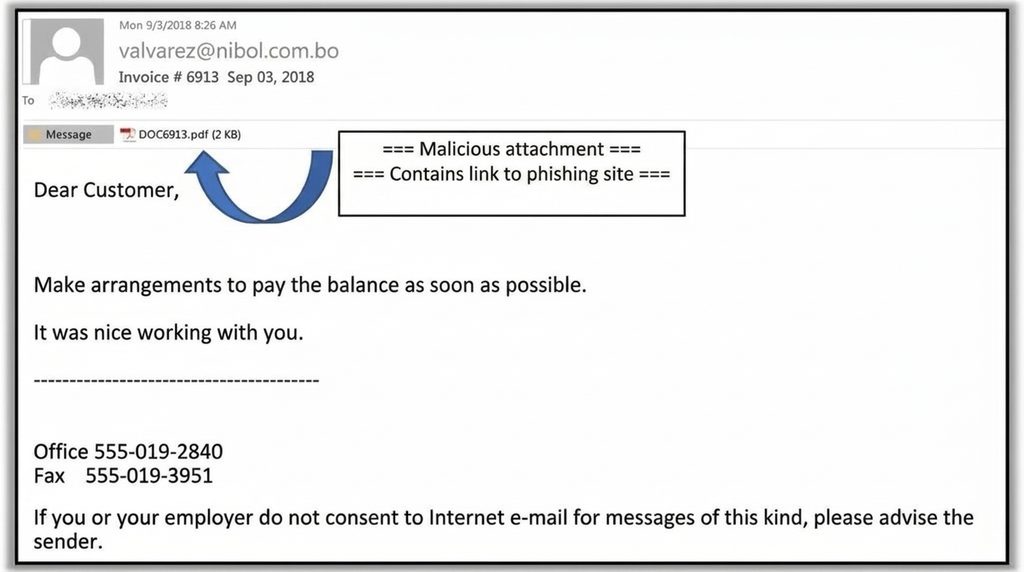
Unexpected email attachments can contain malware, malicious scripts or documents designed to trick users into enabling unsafe features.
For example, an employee might receive an unexpected invoice as a document attachment or a message claiming to contain confidential customer information. The file may appear relevant, but its arrival could be part of a phishing campaign.
Be particularly cautious with unexpected executable files, scripts and macro-enabled documents. However, familiar file extensions alone do not guarantee safety.
Instead, verify unexpected attachments with the sender through a trusted communication method. If the message is unfamiliar or unusual, report it to your IT team before opening the file.
Unexpected requests for passwords, authentication codes or confidential information are major phishing warning signs.
For example, a fake IT support email may ask employees to reply with their Microsoft 365 password or provide a multi-factor authentication (MFA) code to resolve an alleged account issue.
Legitimate security processes should not require employees to disclose their passwords or one-time authentication codes in response to unsolicited email requests.
Never share:
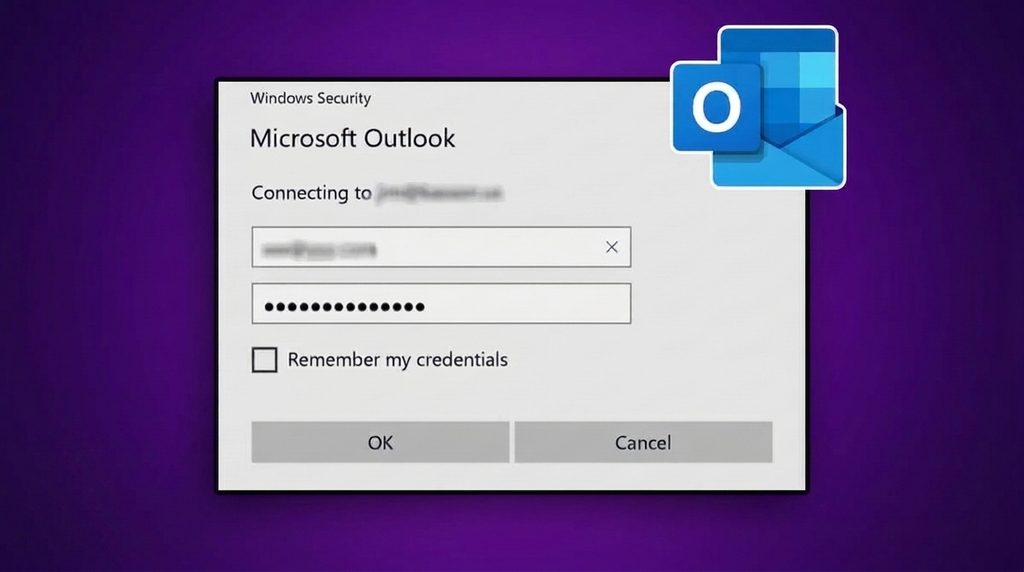
In addition, report unexpected authentication prompts. An MFA request you did not initiate may indicate that someone already knows your password and is attempting to access your account.
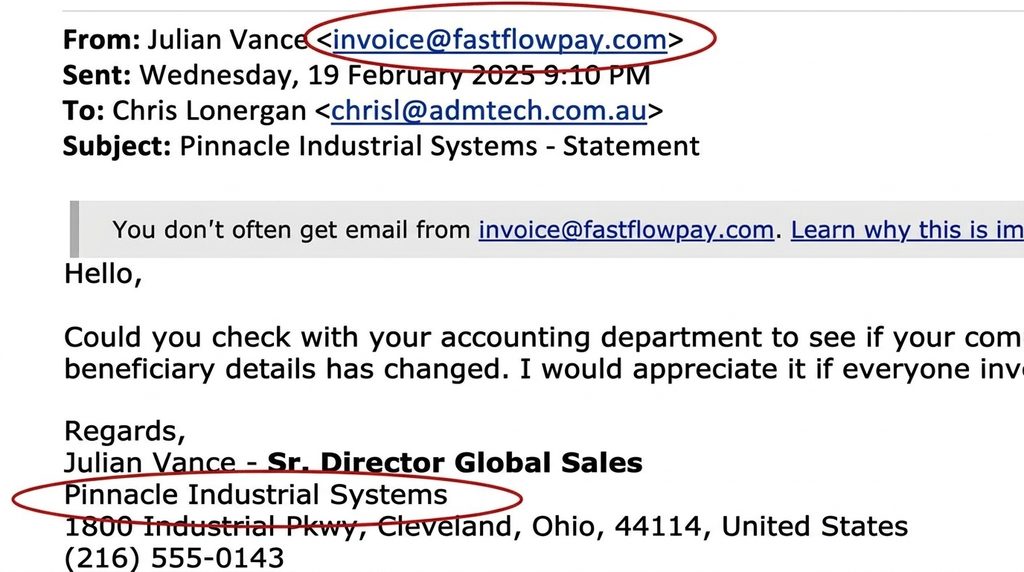
Unexpected payment instructions and bank account changes can indicate business email compromise or supplier impersonation.
For example, a criminal may impersonate a regular supplier and send an updated invoice with different bank details. The email might appear within an existing conversation, making the request seem genuine.
Before processing unusual financial instructions:
Never rely solely on the contact details supplied in the suspicious email. A criminal may control the message and any phone number or link it includes.
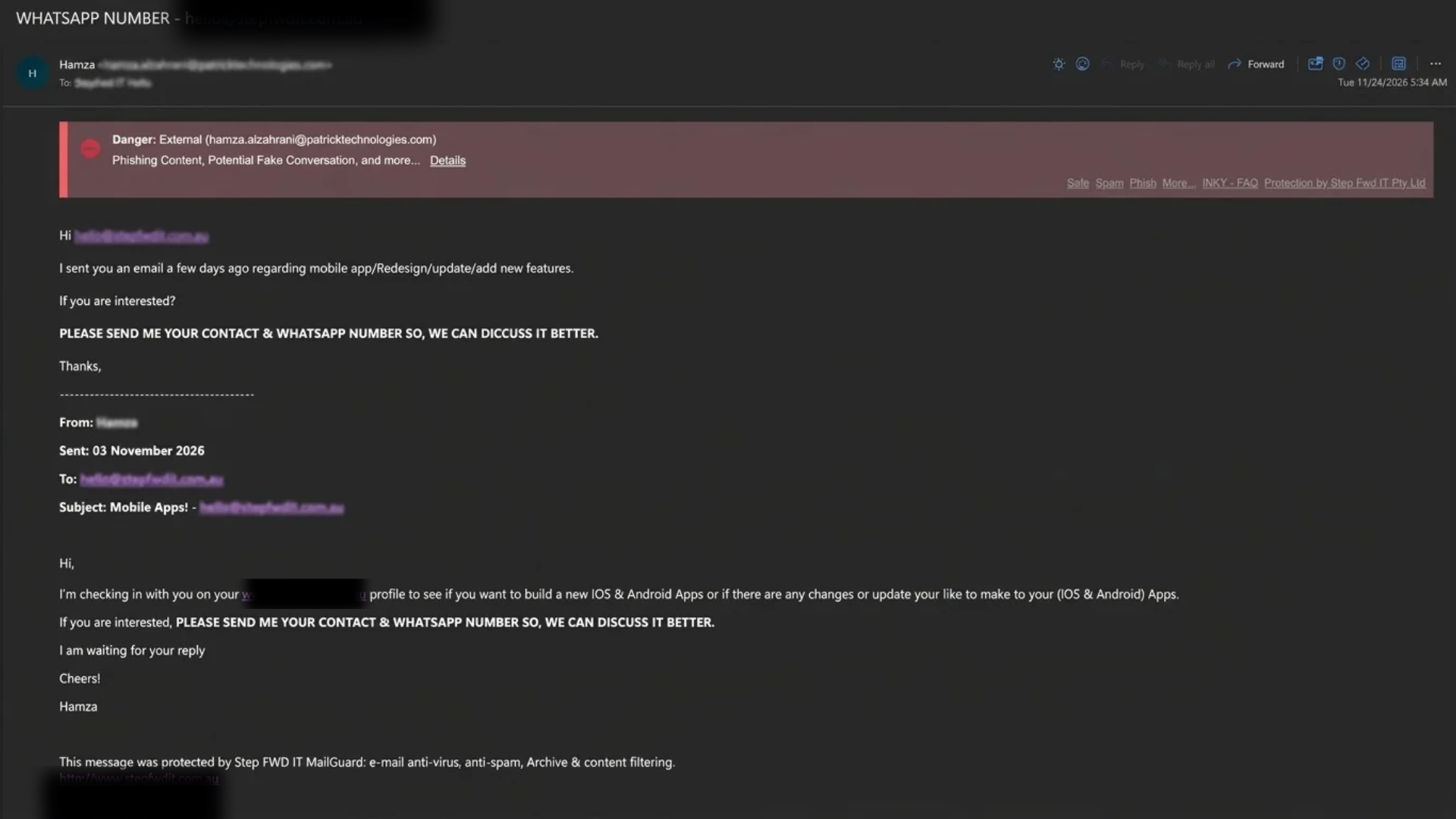
Unusual branding, inconsistent formatting and unexpected requests can help identify suspicious emails.
For example, a message claiming to come from a regular business partner may use an unfamiliar greeting, request information that the partner would not normally need or refer to a transaction that never occurred.
Check for:
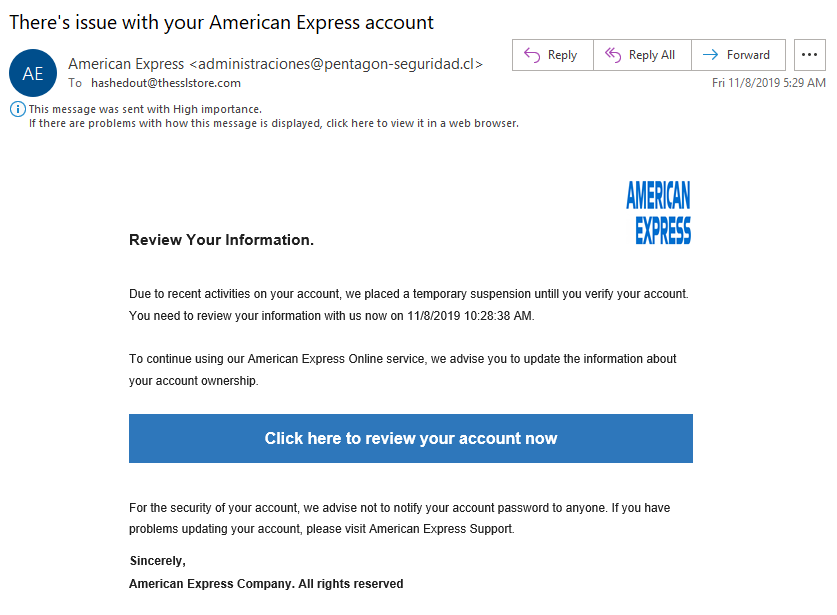
However, poor grammar is not a requirement for phishing. Modern attackers can produce polished messages with accurate branding and natural language. Context, sender identity and independent verification are more reliable than spelling mistakes alone.
The Australian Signals Directorate's 2025 - 2026 Annual Cyber Threat Report provides current reporting on cyber threats and incidents affecting Australia. Businesses should consult the report for the latest agency findings rather than assume that every reported cybercrime incident involved phishing.
Effective phishing prevention involves combining employee awareness training, multi-factor authentication (MFA), email filtering, domain authentication, endpoint protection and an established cybersecurity incident response process.
First, businesses should use a layered security approach because no single tool can address every phishing risk. For example, email filtering may block a suspicious message, while MFA can provide another layer of protection if a password is stolen.
Moreover, businesses using Microsoft 365 should review their security configuration, user permissions and email protection settings.
A suspected phishing email should be reported immediately, and any potentially compromised account or device should be assessed by the organisation's IT or security team.
First, do not interact further with a suspicious message. Your next action depends on whether you only received the email, clicked a link, entered information or downloaded a file.
What Tools Help Detect and Prevent Phishing Attacks?
Phishing protection tools help organisations filter suspicious messages, strengthen account security, monitor devices and educate employees about online threats.
First, technology should support a clear security process rather than operate as a standalone solution. For example, an email security platform may flag a suspicious message, but employees still need to know how to report it and avoid interacting with it.
| Tool or technology | Main purpose |
| Microsoft Defender for Office 365 | Provides email and collaboration threat protection, depending on licensing and configuration. |
| Microsoft Defender for Endpoint | Supports endpoint threat detection and response. |
| Multi-factor authentication | Adds an additional verification layer to account access. |
| Sender Policy Framework (SPF), DomainKeys Identified Mail (DKIM) and Domain-based Message Authentication, Reporting and Conformance (DMARC) | Helps authenticate sending domains and reduce email spoofing. |
| Secure email gateway | Filters suspicious and potentially malicious messages. |
| Password manager | Helps users create and maintain unique passwords. |
| Security awareness platform | Provides employee education and phishing simulations. |
| Endpoint Detection and Response (EDR) | Helps identify and investigate suspicious endpoint activity. |
Moreover, organisations should regularly review the configuration and effectiveness of these tools. Microsoft's security documentation provides information about Microsoft security capabilities and configuration.
Step Fwd IT supports Australian businesses with managed IT services, proactive technology management and practical IT advice. If your organisation wants to review its current security arrangements, a business IT security risk assessment can help identify areas that may need attention.
Concerned About Phishing Threats in Your Business?
Phishing attacks continue to exploit trust, urgency and gaps in business processes. We help businesses strengthen their IT environments through managed IT support, cybersecurity solutions and proactive technology management.


